

How Do I Download Performance Review PDFs?
Learn how to export WorkStory performance review PDFs, download manager-only comments, and bulk-download completed review-cycle files in a ZIP.
In this article
WorkStory administrators and eligible managers can export a full performance review PDF, a manager-comments-only PDF, or a ZIP file containing all available review PDFs in a cycle. The download options shown depend on the person’s role, reporting relationship, review stage, and whether each PDF is ready.
Who can download a performance review?
- Reviewees can download their own completed performance review when it is available to them.
- Review managers and eligible higher-level managers can download reviews for employees within their reporting hierarchy.
- Administrators can download available reviews across the organization.
Download access does not grant permission to edit or participate in a review.
Download one performance review
- Open the performance review.
- Click on Download PDF / Open the Actions or download menu.
- Select the available PDF option.
- Open or save the generated PDF.
If the download option is not shown, the review may not have reached the stage where a PDF is available, or your account may not have permission to view that review.

Full review PDF versus manager-comments-only PDF
Full review PDF
The full PDF contains the review content available for that performance review. Depending on its type and settings, this may include manager content, self-review content, peer or direct-report feedback, ratings, and other sections.
Manager-comments-only PDF
The manager-comments-only option contains only the manager’s written comments and responses. It excludes self-review content, peer feedback, direct-report feedback, and ratings from other sources.
This option is available to administrators and eligible managers when they need to share or archive the manager-written portion without distributing the entire review document.

Download all PDFs from a review cycle
- Open the review cycle.
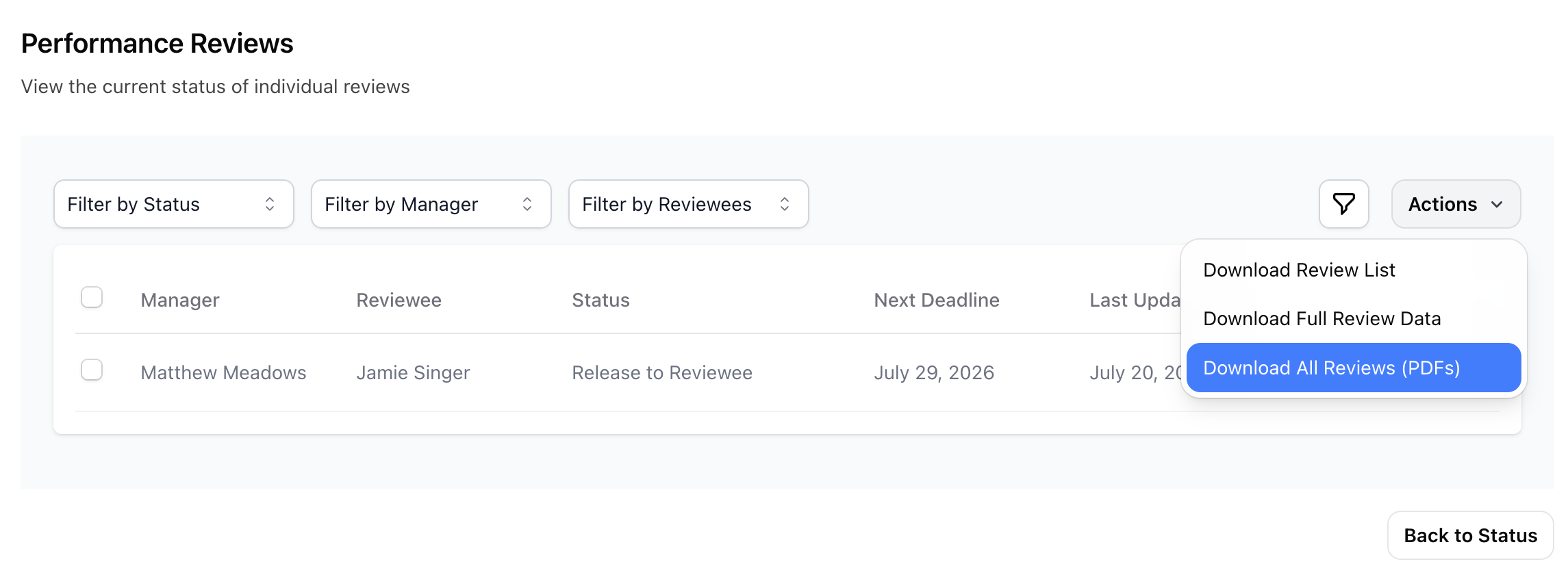
- Go to the cycle’s Reviews page.
- Open the Actions menu.
- Select Download all PDFs.
- Check your email for the completed ZIP file.
The ZIP file is named after the review cycle. WorkStory prepares the file and emails it rather than requiring you to keep the page open.
What gets included in a bulk download?
- Only reviews with an available generated PDF are included.
- Reviews without a PDF are skipped without stopping the request.
- If no PDFs are available, the option may be unavailable or WorkStory will tell you there is nothing ready to download.
Before using a bulk download for recordkeeping, compare the number of PDFs in the ZIP with the number of completed reviews you expected.
Protect sensitive review information
Performance review files may contain confidential employee information. Download them only when needed, store them in an approved location, and share them only with people authorized to view the review.
Troubleshooting
I do not see the download action
Confirm that the review is available to you, that it has reached the appropriate stage, and that you are viewing it through the correct employee or review cycle.
The bulk ZIP is missing a review
The PDF was probably not available when the ZIP was prepared. Check that review individually and request the bulk download again after its PDF becomes available.
I requested a ZIP but nothing downloaded
Bulk files are delivered by email. Check the inbox and spam folder associated with your WorkStory account.
Related WorkStory help
Still need help?
Contact the WorkStory team if your question is not covered in this guide.